
Apple should steal the following 5 Windows features from Microsoft to improve OSX as these are superb UI (User Interface) elements that would enhance the Mac experience. Moving from OS to OS I must admit I do occasionally miss some bit of Windows.
1. Arrange Windows Side by Side
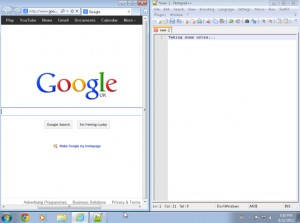
Introduced in WIndows 7 this neat user interface element sets an open window so that it occupies half of the screen when dragged to the side. When you drag another window to the other side it fills the other half. This is particularly brilliant for researching within a web browser and then taking notes within Word.
http://windows.microsoft.com/en-US/windows7/Arrange-windows-side-by-side-on-the-desktop-using-Snap
2. How much free space

This at a glance view of disks and their capacities could easily be introduced to OSX as it can be a pain having to go to either “Get Info” or “Quick View” to find out how full your hard drive is.
3. Hover to Preview

When an application is minimised Windows 7 gives you a good sized preview of what is happening without needing to bring up the whole window. This is particularly useful for applications that are carrying out background tasks that only really require you to look at a progress bar every now and then.
4. Better Application Management

Uninstalling applications by dragging them to Trash feels all wrong. A simple user interface which lists all applications installed and allows you to remove them with a few clicks would be great. I know some might argue that the App Store does this, but I guess that many people (myself included) use more than just the App Store for installing and whilst I’ve been using OSX for a couple of years this is still something that niggles.
5. Birmingham Bullring as a Wallpaper

This one is a little from the left field but I always set the Bullring as my desktop wallpaper when using Windows 7 making my user interface experience complete. Obviously I can steal this image but that’s not the point.
No Responses