If you are blogging with an iPad and using WordPress you may have noticed how much of a pain the admin bar can be.
I find that it hovers over icons that allow me to add links and so on at the most inappropriate times. When I do this it looks something like this:
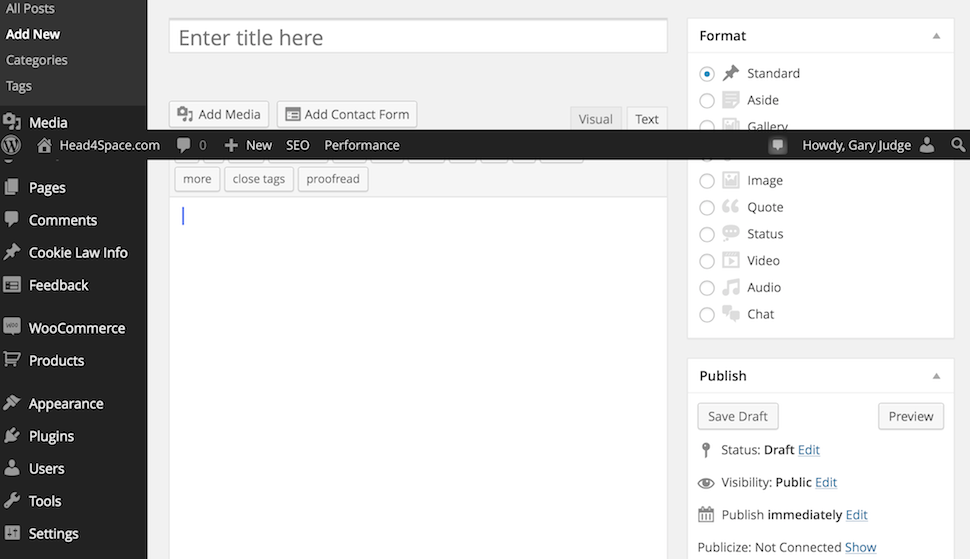
So rather than put up with this frustration any longer I decided to have a look to see what I can do about it.
Following a quick Google search I found the site which describes a short code snippet that would do the business:
http://davidwalsh.name/hide-admin-bar-wordpress
But rather than end the journey there I decided instead to look at plugins. A quick sift through the available plugins provided a few choice options. I decided to plump for the ‘Disable Admin Bar and Toolbar’ plugin as it was last updated a few weeks ago and appears to do what it says on the tin.
When activated the plugin does what you’d expect it to – it removes the black bar at the top wherever you happen to be on your site. This is particularly useful for iOS / iPad bloggers as it means that you no longer have to put up with the admin bar getting in your way whilst using your browser to post and update your site.
For me this is a revelation as I no longer have to work around this annoyance and to be honest I barely miss the bar anyway. So if you are trying to blog on your own WordPress site with an iPad I strongly recommend that you look into using this plugin as it might be just the ticket.
Photo Credit
No Responses