
I’ve been taking notes with the Adonit Jot Pro on my iPad for the last couple of weeks and impressed by howwell you can write with the stylus. Here are some initial impressions for those interested in going paperless using this pen.
Build Quality
The build quality is excellent as it is constructed from metal with a rubberised grip. There is a metal screw cap which protects the delicate nib whilst not being used. When the screw cap is not protecting the nib then it can be safely screwed to the top of the stylus so that this doesn’t get lost.
The nib is a plastic disc which allows you to see more accurately where your mark is being made. This is potentially vulnerable so careful use is the order of the day – although I understand that you can purchase replacement tips if yours does break.
Use
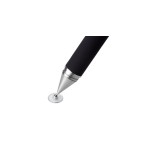
It is worth noting that the iPad doesn’t always recognise the metal tip as the centre so the marks on screen may be slightly off set. That said this has to be the most accurate stylus I’ve tried and the iPad isn’t really designed to work with a stylus so this is something you need to live with (or buy a different device).
It is possible to use the pen for hand writing and is legible for reading (assuming that your writing is). You do need to focus on being neat as this helps when reading at a later date but is great for short scribbles.
Where the Jot Pro shines is as a stylus for sketching diagrams and teamed with the right app you will find that this quickly becomes an indispensable tool for this task.
Apps
I’m currently exploring the use of two apps with the Jot Pro
Penultimate – This provides lined paper and different coloured pens for easy scribbling. I mostly chose this app as it integrates directly with Evernote and allows you to save your handwritten notes to it directly.
iDraw – This app is a rather nifty vector based drawing package which is particularly good at drawing diagrams with. It has some of the basic shapes that you need to create a diagram (arrows etc) and is great for visualising an idea quickly.
No Responses